

Did you know that a small Norwegian startup is about to launch thefastest car damage detection processin history at the time this article was published?
On average, this process takes 15 minutes to complete, but thanks to AI technology and business process automation (BPA),Wennmanaged to reduce this number to 6 seconds, which is 99.33% less than the current industry standard.
While it may seem like something out of a science fiction movie, outages like these are becoming common thanks to business process automation (BPA).
However, the relationship between automation and business processes is not always clear, and one of the best ways to understand it is by looking at examples, which is exactly what we will do in this article. You’ll see real-world business process automation examples powered bybusiness process management toolsthat anyone can deploy in minutes.
Now, let’s define business process automation so we’re all on the same page before diving into the examples!
What is business process automation?
Broadly speaking, business process automation (BPA) refers to the use of technology to automate and optimize business processes in order to increase operational efficiency, reduce human errors and costs, and improve overall productivity.
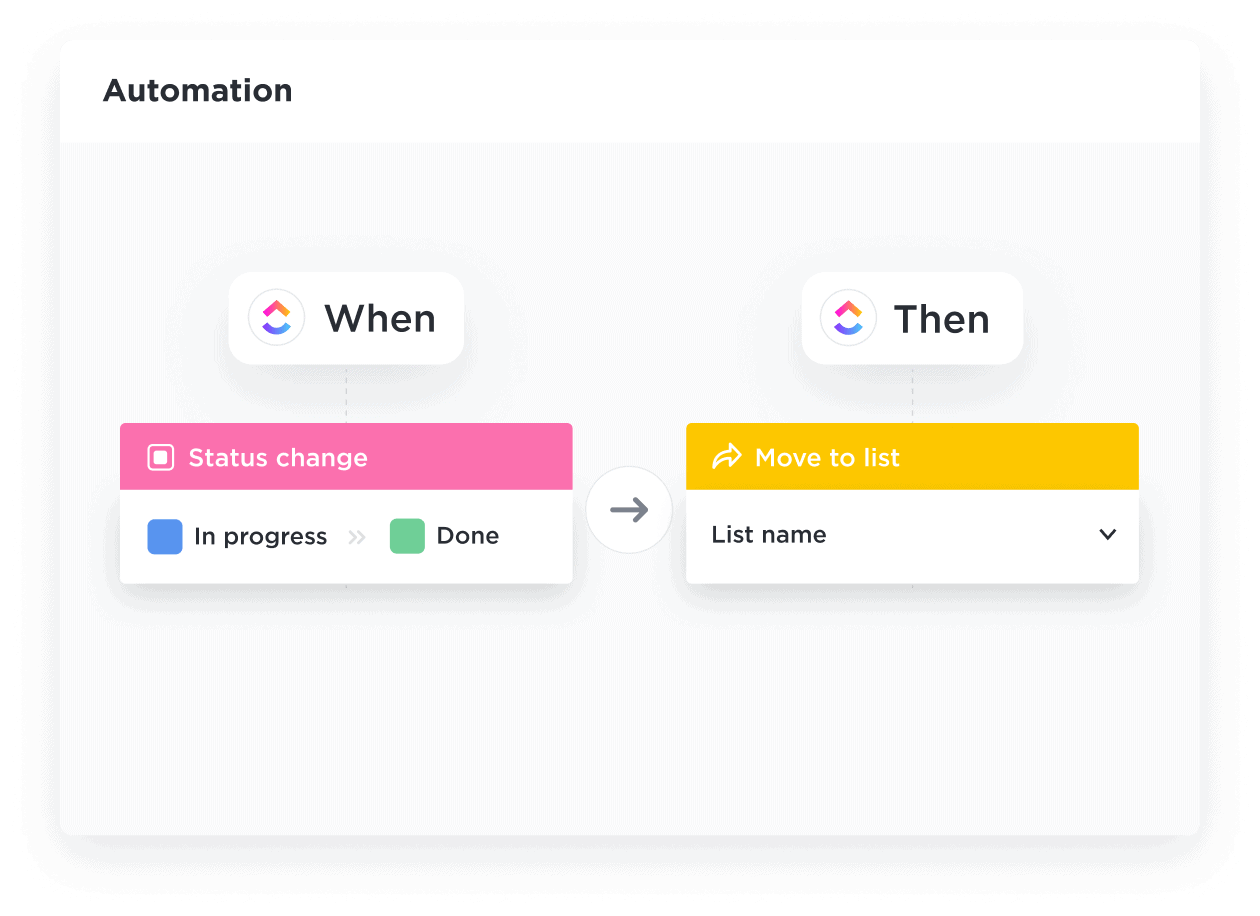
In short, the main goal of BPA is efficiency. ⚡️
BPA is a planned, high-level effort to automate multiple manual tasks into aprocess to improve productivity and efficiency. This is the north star of every BPA strategy, the main driver behind all efforts to automate processes in a company.
How does business process automation help organizations?
By improving the efficiency of business processes, BPA increases productivity, reduces costs, and allows people to focus on high-value activities that require human expertise and creativity.
This translates into multiple benefits, such as:
- Operating costsreduced
- Less dependence on capital-intensive human resources
- Process scalability
- Fewer manual entry errors
- Better customer service customer
- Simplified business operations
- And more
In addition to these tangible, measurable benefits, BPA can improve employee satisfaction by taking the most repetitive tasks off their hands and leaving them with responsibilities that require critical thinking, creativity, and problem-solving skills.
Overall, the benefits of BPA are clear: it helps organizations achieve greater efficiency, accuracy and consistency in their operations, while reducing costs and improving customer and employee satisfaction.
PRO TIP
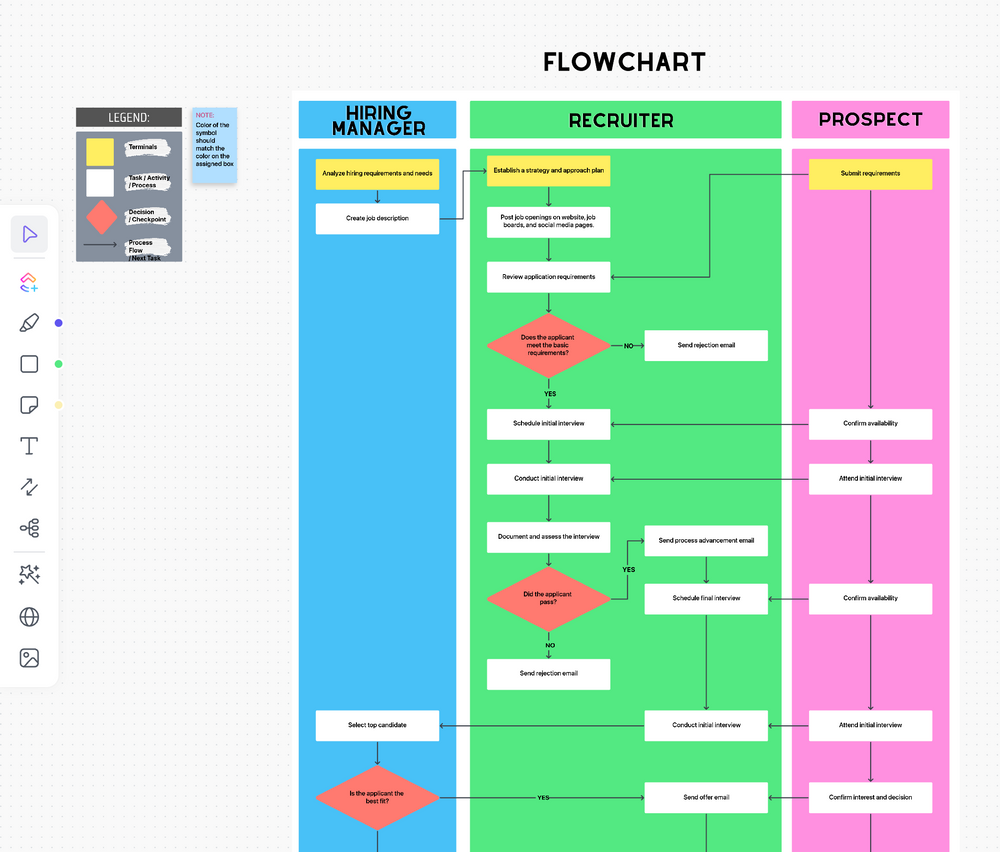
Process mapping is a crucial element in executing workflows and processes of efficient business.Use reliable and highly functionalprocess mapping tools and theClickUp process flowchart templateto create a visual representation of your processes. Creating a detailed flowchart before setting up your automation can help ensure the process is smooth and error-free.
BPA is about software?
The answer is yes. Business process automation is primarily done with dedicated software products and/or custom code, usually, but not exclusively, a combination of both.
BPA software can involve a variety of technologies, including code, robotic process automation (RPA), cloud-based workflow automation, machine learning, artificial intelligence, and natural language processing.
In addition, more than one tool can be used to automate business processes at the same time. For example, a company might use RPA tools to automate processes involving legacy or self-hosted applications, and then use another set of tools to automate processes and workflows involving cloud-based applications or internal APIs.
Tools and software that enable companies to automate business processes includeClickUpandMakeespecially if your application stack is cloud-based, but there are also other business process automation software you might consider depending on your needs, the applications you use, and the processes in place.
PRO TIP
Theintegration can save you time and automate any process between ClickUp and other work applications — none technical skill is required. By using ClickUp as a BPA software and connecting it to Make, you will be able to design, build and automate simple to complex workflows to streamline your work. Simply set triggers and conditions to automate hundreds of actions and use pre-built templates to help you get started right away.
What type of processes fall into the BPA category?
It’s important to note that BPA encompasses many activities, from manual data entry every day to automating entire processes, workflows, and tasks. The difference between them is in the complexity, number of tasks or steps and subtasks involved.
For example, your BPA strategy may envision automating an entire candidate hiring or employee onboarding process. This process would include workflow and specific tasks as well. An example of a workflow within this process would be coordinating theinterview processwith candidates and scheduling training sessions.
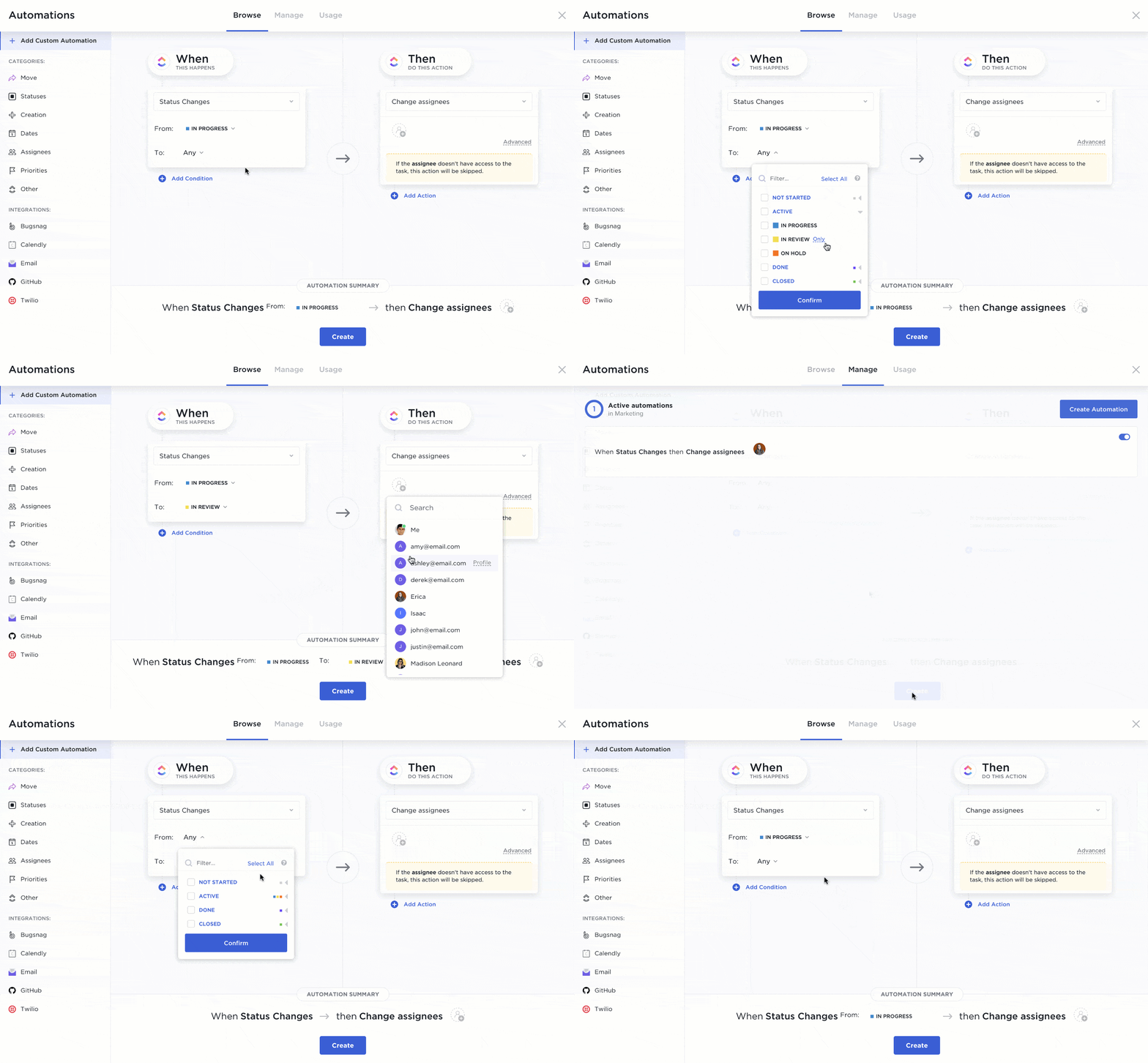
And within this workflow, specific tasks can also be automated, such as creating Zoom meetings, sending invitations to those meetings via email, storing meeting recordings for later review, and so on. Digital process automation will simplify and speed up all these tasks, workflows and processes.
Which business processes can be automated?
The number of business processes that can be automated can be counted in the thousands. In fact, most business processes can be automated, fully or partially, regardless of area or department.
For example,HR can automate processes, such asrecruitment, onboarding and dismissal of employees. Marketing can automate virtually any manual process, from keyword research and content production to advertising campaigns and social media management. IT, of course, is another area that can streamline processes with automation, including bug tracking, monitoring, application development, database management, and other manual processes.social media management. IT, of course, is another area that can streamline processes with automation, including bug tracking, monitoring, application development, database management, and other manual processes.
There are virtually no limits to what you can do with the right tools and platforms, and that’s what we’ll show you next: BPA automation examples you can implement right away with Make and ClickUp integration.
PRO TIP
Learn how to create automation in ClickUp and take a look at 10automation examplesto help you create automated workflows, increase productivity, and leverage time-saving templates.
3 real-world automation examples business processes
Example 1:Business Process Documentation
Automation idea: document review workflow
Document review is a task that can be found across multiple processes in most organizations.
From contracts and service level agreements to blog posts and public relations releases, companies spend countless hours making sure documents are reviewed before they serve their purpose. And while the review part can be tricky, all the steps surrounding it can be easily automated with tools like Make.

This template includes Google Drive, ClickUp, Make, and Slack and allows you toautomate the document review processgenerally by “watching” for new Google documents in a Google Drive folder.
Once a file is uploaded to Google Drive, Make creates and assigns a task in ClickUp and sends the file in question via Slack to the person designated to review it.
The result is an agile document review process that delivers documents to reviewers and creates the necessary paper trail, all without human intervention.
Example 2: Sales
Automation idea: trigger tasks to nurture and convert new leads
Salesforce Opportunities typically trigger a series of related tasks that are critical to closing a potential deal. These tasks can be anything from submitting documents with extra information to assigning an expert, and often putting these tasks into action requires manual action from the person who created the Salesforce opportunity in the first place. However, it is also avoidable and easy to automate.
This is far from ideal, as it consumes resources and is prone to errors (usually someone forgets to assign the necessary tasks). However, it is also avoidable and easy to automate.
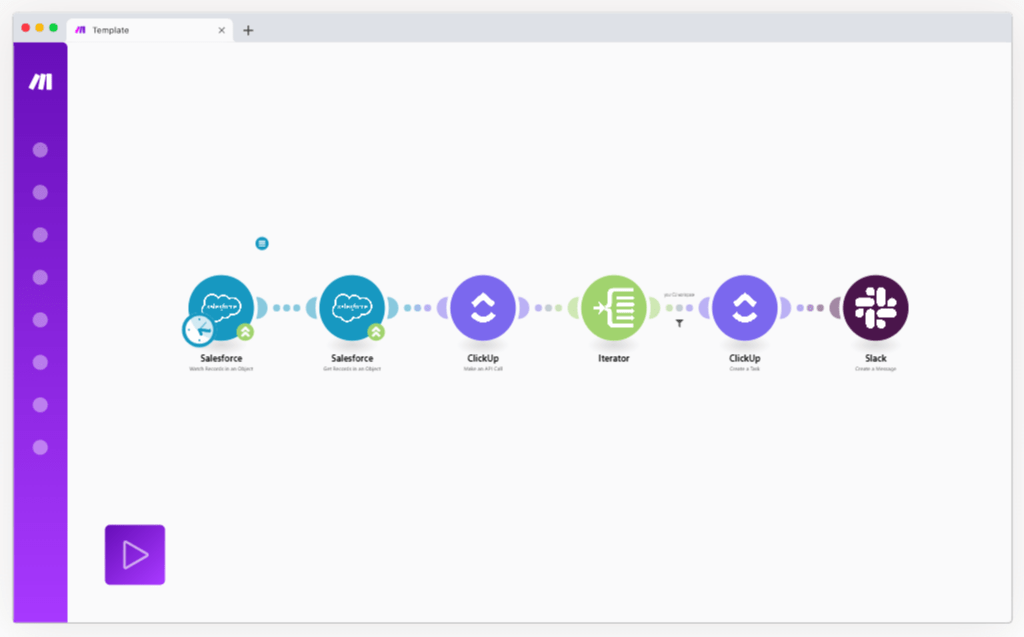
This template, which includes ClickUp, Make, Salesforce, Slack, and Flow Control, is incredibly useful for this as it allows you to automatethe lead nurturing process— trigger any task you can imagine after creating an opportunity in Salesforce.
Let’s imagine a simple use case for this: You have an eBook to generate leads and you offer it for free to anyone who gives you their contact details.
Once a new lead appears, you create the Salesforce opportunity and need to nurture it via email and retarget it with Facebook ads.
With the model above, you can trigger these (and more) tasks automatically every time.
Example 3: Web analytics
Automation idea: track and aggregate web performance data
Like this like reviewing documents, tracking website performance is something that most, if not all, businesses need to do constantly.
However, there is a problem: Google Analytics is not exactly a lightning-fast application and logging in every day to get the data is a huge waste of time.
But then again, you can automate the entire process and start receiving the data instead of look for them.
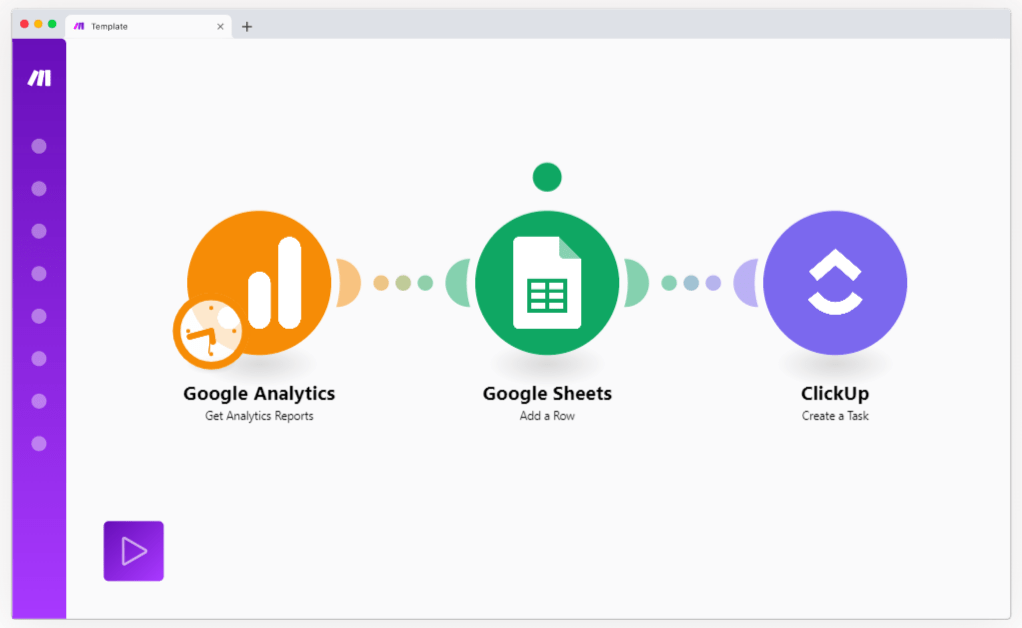
In addition toaggregates analytics data into one spreadsheet, Make can assign anyone the task of reviewing them by creating a task in ClickUp – this way no important event goes unnoticed.
How to automate your first ClickUp process
There are two easy ways to start automating processes from ClickUp.
The first option is to rely onClickUp Automation, a series of native solutions offered by ClickUp.
You’ll find a lot of value in this offering if you rely on ClickUp to run and track your core business processes.
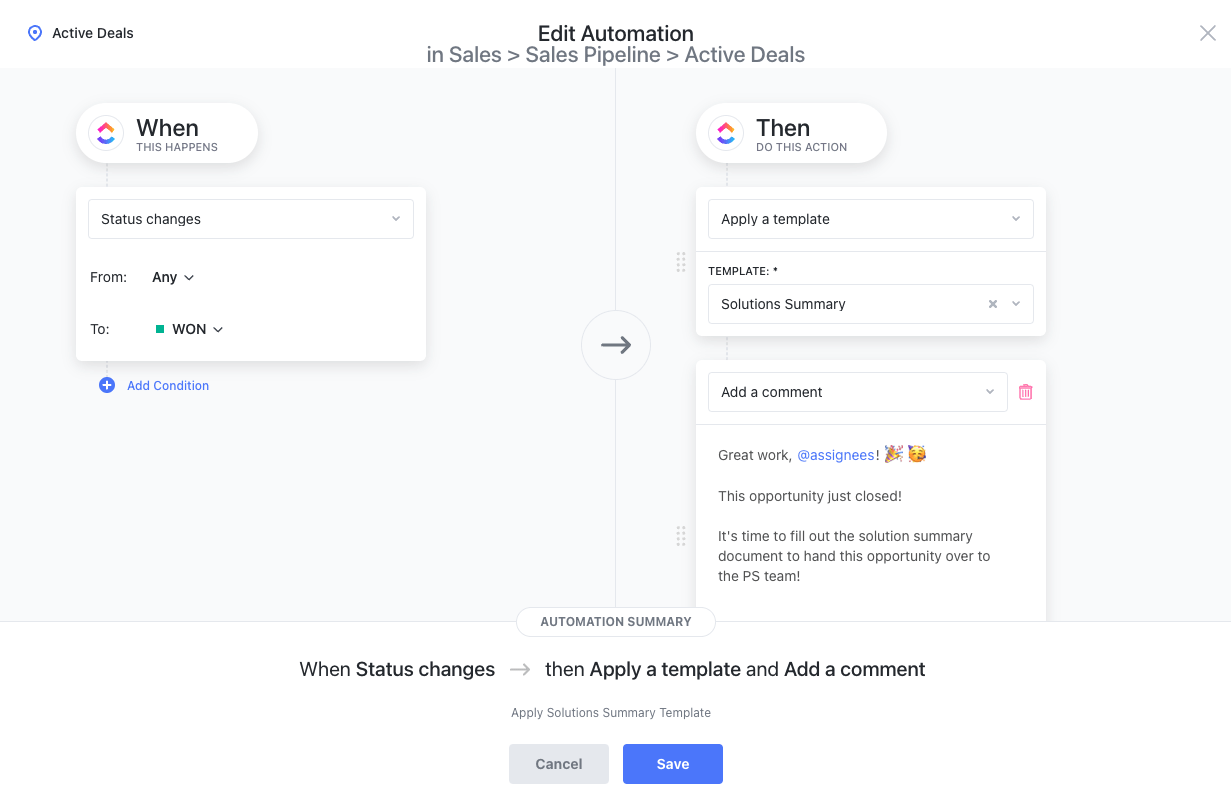
The second option is to integrate an automation platform likeMake, which allows you to design, build and automate anything on a visual platform.
If you have a growing stack of cloud applications and want to scale your automation strategy, you will find Make a unique solution capable of handling any type of process.
Final words: a tendency to have in mind
One of the most interesting things about automation is that, according to the2023 State of SaaSOps report, 7 in 10 companies have already automated at least one key process and 4 in 10 have dedicated automation functions.
This speaks volumes about business process automation: it is not just a possibility, as something that may or may not happen.
Instead, it is something that is already being implemented in the main companies in the market.
Given this and how easy-to-use automation tools are these days, it’s only a matter of time before all businesses start to get rid of the boring and repetitive and switch to rewarding activities to boost their business and reduce risks due to human error.
And the best way to kickstart these efforts is to use two powerful business process automation software together: ClickUp and Make . With these tools, you will be able to easily create automated business processes with minimal human intervention and effort.
It’s time to supercharge your business. Start your digital transformation with BPA software today — automate manual processes to work faster and smarter than ever before. ⚡️
Explore more
Everything TaskUP does with ClickUp, in English.