

Agile team: Want to understand what an Agile team is and learn how to become one?
With tons of companies adopting the Agile approach to their projects, it is quickly becoming the go-to management approach for greater productivity.
But what is anAgile team? And how can your team become one?
Here’s everything you need to know.
Let’s get started.
Agile team: What is it?
An Agile team is a specialized project team created to address the needs of Agile project management.
However, before we explain thestructure of theAgile team, it is essential to understand what Agile project management is:
What is Agile Project Management ?
Agile project management is a modern project management method that breaks an entire project into smaller development cycles. By breaking your project into smaller cycles, you can continually incorporate customer feedback and provide them with a final product that satisfies them.
These cycles, or “sprints,” are assigned to different independent Agile Project Teams in your company to increase speed and efficiency.
Based on the Agile Manifesto, this management process prioritizes test-driven development in response to customer feedback.
How do these sprints help?
With these sprints, you can divide yourprojectto incorporate customer feedback at all levels.
For example, if you are working on an application, you can develop one feature during each sprint. After each feature (sprint) is complete, you can ask your customers to try it out and give feedback on what they like and don’t like.

Once you’ve incorporated their feedback, you can move on to the next set of features (sprint)!
How does this help?
How can you not isassumingwhat a customer wants, it can provide them with a final product that wasactuallybuilt with his input!
The Agile Team Structure
Agile teams are typically small, high-performance teams of 5 to 11 members with complementary skills. Unlike other project teams, Agile project teams need to be very adaptable and self-reliant.
Why?
Because they need to deal with changing customer demands at every stage of the project !
To achieve this team dynamic, they are typically structured like this:
A. Product Owner
The product owner is the link between the customer and the team. They will oversee the entire operation and collect customer feedback. They relay customer demands to the project team and ensure that the team remains focused on those demands.
B. Project Manager
The project manager holds team members accountable and helps them when needed. Managers get customer feedback from the product owner and guide the team through the sprint.
C. Team Members
Team members are those who work on the project . Although they are mostly self-reliant, the project manager can guide them to focus on their tasks and activities.
D. Project Stakeholders
While they are not necessarily involved in the development of the project, project stakeholders have a connection to it.
Stakeholders include members with different sets of skills, such as senior project managers, marketers, and support team members, whose contributions steer the project in the right direction.
A note about the Scrum team
Remember, agile project management is a broad management style with many variations.
Of these variations, the Scrum approach is one of the most popular agile methods. Unlike other variations of Agile, Scrum has a very specific team structure.
Here is a more detailed look at the Scrum process and its team building:
- The Scrum Process – Just like the Agile process, Scrum divides a large project into small parts that project teams (Scrum teams) handle one by one.
- The Scrum Team – The perfect Scrum team is usually a small team of 5 to 6 members. The project manager becomes the “Scrum Master” and handles daily Scrum meetings to keep team members on track.
How does an agile team compare to other teams?
Traditional project team activities are very rigid and structured.
Typically, in these systems, entire departments are involved – which can extend the lifespan of a project to more than three to four months!
See how Agile improves on these traditional methods:
A. Better Equipped to Handle Changing Customer Needs
Traditional projects often do not incorporate customer feedback until the productis alreadycompleted and released.
Although this allows teams to work uninterruptedly can result in customers receiving a product that doesn’t meet their needs.
Because the Agile development process gives your customers ample opportunities for feedback, it’s easy to tailor a final product to their needs. You’re not creating a product with whatyou thinkthey want – you’re actually involving them!
Traditional teams don’t have the ability to make frequent changes to the product.
But agile teams are – well – ‘agile!’ They are structured to quickly adapt to changes in direction based on customer feedback.
B. Better accountability
One of the main problems with traditional project management is the lack of accountability. Withlargeprojects undertaken bylargegroups of people, it’s easy for employees to not know their exact role or what is expected of them.
With agile practices, however, everyone knows exactly what they should do.
Why?
- Because the team is so small, it’s easy for everyone to know exactly what they’ve been assigned
- With a project manager (or Scrum master ) and product owner overseeing things, they can get quick feedback on their work immediately
Plus, because an Agile delivery can constantly change in such short time frames, everyoneYOUhave to be on top of everything to get things done on time!
How can an agile team increase its productivity?
Agile teams are small, self-sufficient teams, where each member’s contributions are valued. Because the Agile team structure allows for quick response times, it’s easier to stay on budget.
While the Agile approach used to be limited to software development, that’s no longer the case.
Agile software development isn’t the only way to benefit from this approach.
Agile can help anyone team!
Here’s how:
1. Faster response times
As you break your projects into smaller, manageable chunks, they become easier to tackle.
Additionally, because agile methods are designed to handle the ever-changing project demands, feedback does not slow down agile delivery in the same way that traditional projects are affected.
2. Cost-effectiveness of Agile teams
Because the Agile team structure allows for quick response times, it’s easier to stay on budget.
Think about it .
Because you have the skills to deal with ever-changing demands, scope creeps won’t affect an Agile team’s results in the same way that a traditional team is affected.
3. Improved employee morale
Because agile teams are small, self-sufficient teams, each member’s contributions are valued. Everyone, from Agile team members to stakeholders, has a vital role to play, which can increase their sense of accomplishment.
Furthermore, since project managers are only supposed toguidethe team in the right direction, it’s up to the team to get things done on your own. This will boost your self-confidence – boosting your overall morale.
4. Deliver high-quality projects that satisfy customer needs
The final productivity test is a deliverable that customers love!
Because your high-performing teams are constantly receiving customer feedback on all of your sprint releases, you’ll be able to provide your customers with a deliverable that satisfies their needs.
Measure your Agile team’s productivity with these12 Agile metrics ! 💜
How to become an agile team
A recent ClickUp case study found that 51% of American workers feel they waste at least an hour a day being inefficient at work.
If you follow these Agile best practices, you can create high-performance teams built to work quickly and efficiently.
Here is a step-by-step guide on how to become an Agile team:
1. Introduce the methodology and rules
Before your team becomes anAgile team, it needs to understand what thepractices are Agile, right?
Explain the methodology and team roles, and explainwhyyou are switching to this management method. Describe its benefits and how it differs from what they were already doing.
Clarifying this at the beginning will make it easier to adopt the agile mindset for your team.
2. Plan your first month
Once you explain the Agile process to them, you can start building an Agile environment
The first step is to select a project, build your product backlog and divide it into sprints (your product backlog is all the items you will work on in a project). Additionally, consider how many sprint teams you will have and what each will be working on.
It is essential to include your team in this sprint planning process and get their input.
Why?
By involving them here, you are familiarizing them with the responsibility of doing things themselves.
3. Decide the team roles
Next, decide the roles of the sprint team members.
It is vital to first select a product owner and then project managers for each sprint. Typically, the product owner should be someone familiar with the Agile methodology and experienced in dealing with customers and conveying feedback.
Your project managers may be experienced employees who you would like to turn into managers or Scrum masters eventually.
However, this does not mean that your Agile project team should be inexperienced.
Remember that sprint team members need to beself-reliantand have complementary skill sets.
That’s why it’s a good idea to have a test project to help everyone adopt the agile mindset in a risk-free agile environment. This will boost their confidence – helping them better understand their team roles while dealing with the needs of Agile project team management.
4. Hold Regular Meetings
An essential part of building an agile environment is holding regular meetings.
This keeps everyone informed about the development process and holds everyone accountable.
Agile management generally has two different types of regular team meetings:
- Daily Standups:These are daily meetings to go over what you did yesterday, what you’re trying to do today, and what you need help with. It’s a good place to assess how things are going and build your team’s dynamics.
- Sprint retrospectives: These are review meetings heldaftercompletion of a sprint. Here, you review how the sprint went, what went wrong, what you liked and much more. It’s a great way to get the data you need to handle new user stories (sprints) in the future.
5. Use Agile-based project management software
If you want to implementallthese steps, you will need the right project management software. This will help you centralize all your Agile processes so you can stay on top of everything with ease.
A good Agile project management tool will help you:
- Develop and maintain your product backlog
- Plan and track your sprints
- Communicate with your team
So you won’t have any problems implementing the Agile method in all your projects!
How to manage an agile team with ClickUp: the #1 agile project management platform
You can’t manage an Agile team without the right Agile tool, right?
That’s why ClickUp was built for Agile project management!
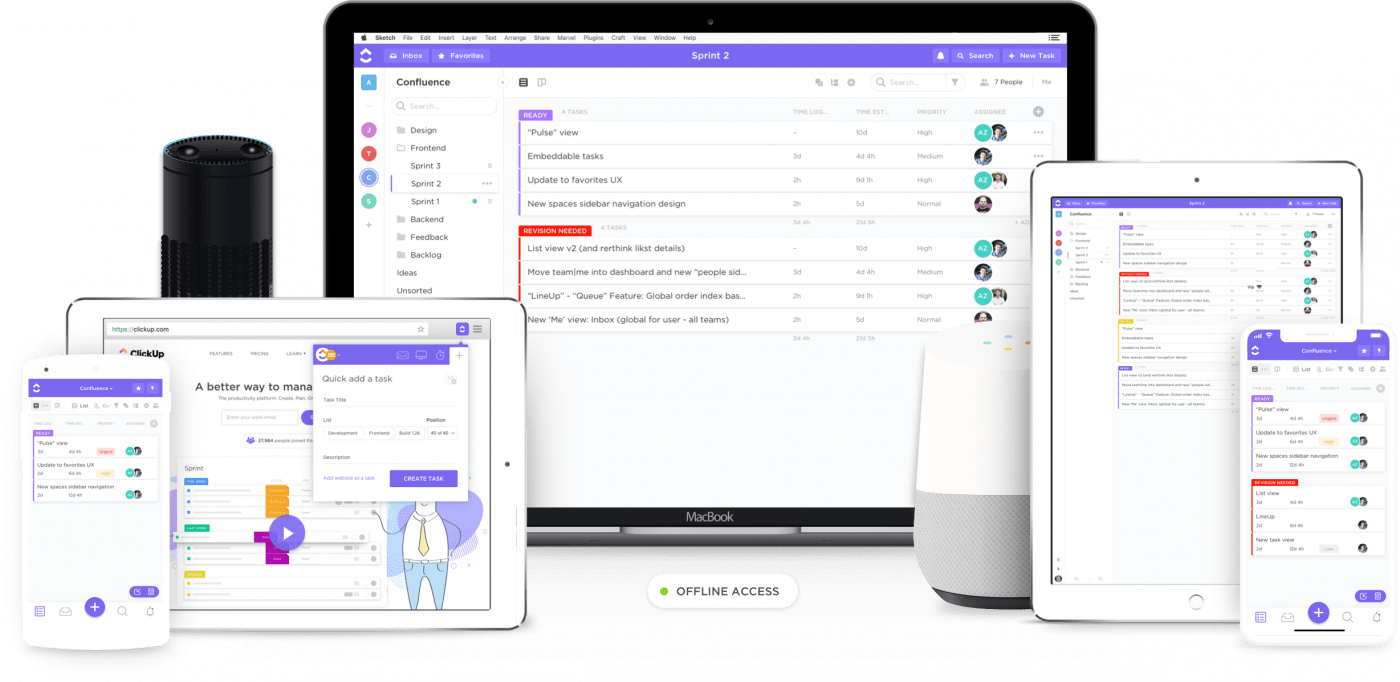
ClickUp is the highest-rated project management tool in the world . It’s used by personal entities, large enterprises, and small businesses and has tons of features to keep your Agile projects on track!
Using ClickUp is super easy and will help you become an Agile team quickly.
See how ClickUp helps your Agile team :
1. Adapt to different management preferences with multiple views
An ideal Agile environment is highly adaptable to change.
That’s why your Agile management tool needs to reflect this too!
Fortunately, it isexactlythat’s what you get with ClickUp.
Instead of using a rigid management tool thatforces you to adaptto its interface, ClickUp gives you multiple views toadapt to your team!
See what these views look like:
1) Required Task Views
ClickUp has two required task views that adapt to different project management approaches :
A. Board View
ClickUp’s board view is great for fans of the Kanban Agile approach. It helps you move tasks quickly to keep up with Agile development principles. All you need is a quick glance to determine what stages your projects are in and move them instantly!

B. List View
This is a great view for project managers who approach their work with GTD-style task lists. Here, your team member’s tasks are listed in a simple checklist . As you progress, you can check off your tasks and move on to the next sprint.
ClickUp
2) Box view
The Box view is the perfect view for any Agile team. It’s a high-level overview of all the tasks your team currently has in progress.
How you use this view for agile teams
Project managers can use it to get a high-level overview of everything that’s going on. Because sprint tasks are sorted by assignee, project managers can immediately find out what each team member is working on and make any necessary changes.
3) Calendar View
ClickUp’s Calendar view helps project managers plan and manage their work schedule quickly. You can check all your upcoming tasks and quickly prepare for them.

Using this view with agile teams:
You can use this view to sprint plan and track your upcoming tasks. You can even use it to identify when you can add items from your backlog.
Since Agile development involves change and adaptation, a project manager can even switch between calendar views.
Project managers can view their calendar as:
- Days: to view project tasks scheduled on a given date
- 4 days: to view tasks scheduled over a rolling four-day period
- Week: to view your weekly sprint schedule
- Monthly: to view thescriptof your project for the next month
4) Me Mode
ClickUp’s “Me” mode will only highlight comments, subtasks and task lists assigned to you. This will minimize distractions – helping you focus better on your tasks.

2. Track your agile sprints with sprint lists
If you want to manage sprints effectively, you’ll need to create sprint lists, right?
Here’s how to do it in ClickUp:
With ClickUp, you can keep track of all your projects, tasks, and subtasks with checklists. This way, you can create sprint lists that detail deliverables for a period of time. Simply check off items from these lists as you move into the next sprint.
You can easily do your sprint planning and even add scrum points to each of these lists to easily handle your product backlog .
Agile team managers can also use these checklists as references in their scrum meetings with their development teams.
See how to set up an Agile workflow!
3. Visually track your projects with agile dashboards
When following agile practices, it’s important to visually trackvisuallyall your data. This makes it easy to quickly take stock of your deliverables and act on them.
Here’s how to do it in ClickUp:
ClickUp Dashboards are ideal for high-level overviews of your Agile team’s activities. You can add your sprint lists and tasks to these dashboards to see how things are progressing.
Here’s a more detailed look at the different things you can track:
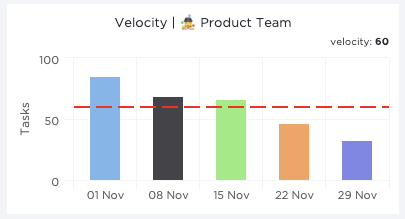
A. Speed Charts
With ClickUp’s speed chart, you can quickly determine your task completion rate. It divides your tasks into weekly or bi-weekly intervals and your average speed is displayed here.
ClickUp also automatically groups your sprint list data for easy addition to your charts!
B. Burndown Charts
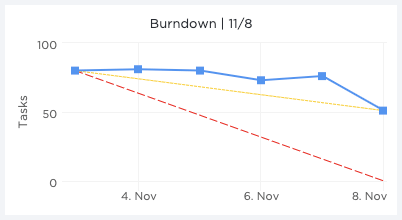
With ClickUp burndown charts, you can see how your team is performing against a target line. This way, you can easily see how much work remains to be done.
Here’s what a burndown chart highlights:
- Progress goal: The ideal pace of task completion needed to meet your deadlines
- Projected progress: Your current trend rate based on the tasks currently completed
- Active:the actual number of tasks currently completed
C. Burnup charts
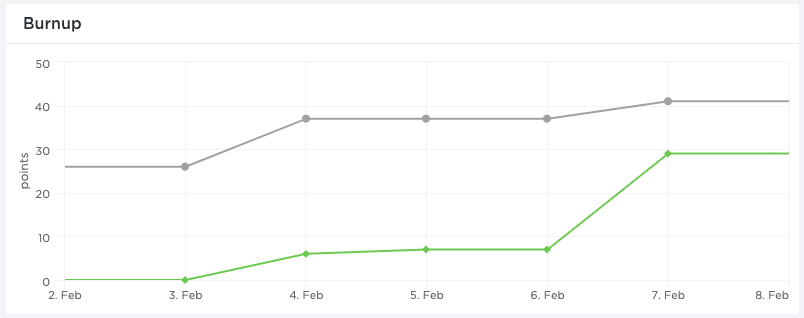
Burnup charts show youwhat has been completed in relation to your remaining scope.
This way, you take stock of what you have achieved so far and can motivate your team to reach the finish line.
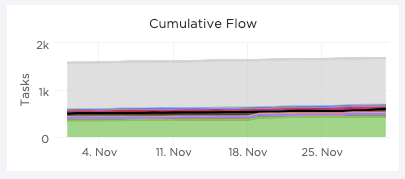
D. Cumulative flowcharts
With ClickUp’s cumulative flowchart, you can visualize and track project progress over time. Because your tasks are color-coded according to their status, you can quickly determine where things are and immediately identify bottlenecks!
4. Keep your agile project moving forward with assigned feedback
Agile deliveryis all about being fast and efficient, right?
But what if your team is taking too long to act on your feedback?
How will you keep your projects on track?
Here’s how you can use ClickUp to prevent this from happening:
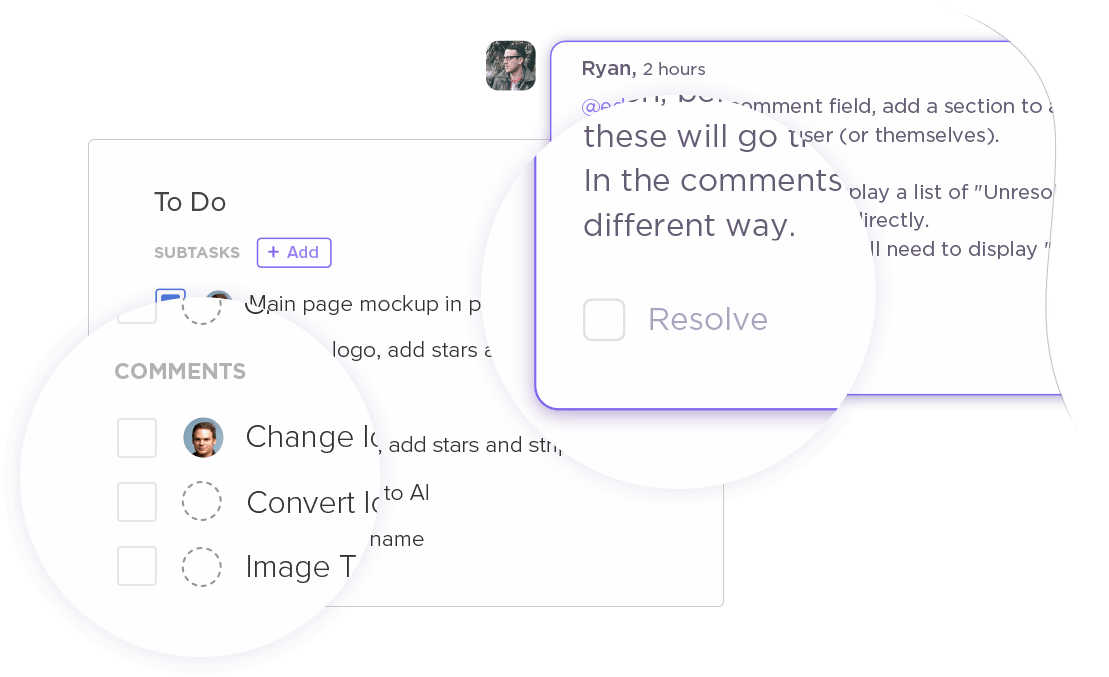
Project management software allows you to instantly convert a comment into a task and assign it to a team member. They will be notified about this and will even appear in the task tray to help them get started right away.
Once they are finished, they can mark the comment as resolved to eliminate any unnecessary follow-ups.
5. Make project collaboration easier with comment sections
Active team collaboration is one of the most important elements of any Agile project management software. Your team needs to use it quickly to communicate project updates and collaborate on the development process.
Here’s how to implement it using ClickUp:
Each task comes with its own dedicated comments section to help your team exchange files and ideas. They can even tag people and share project updates to keep the project on track.
Project management software can also integrate with various communication tools such as Slack and Skype to ensure that efficient project communication is always just a click away!
6. Manage multiple Agile project stages with custom statuses
The beauty of agile methods is that they can be applied to many different domains.
It doesn’t matter if they are funnels sales, marketing or website/software development – you can apply Agile to everything!
But just because you can use the same methodology for different projects doesn’t mean they’re identical.
Each project has its own niche-specific stages and requirements. Our Agile tool must be able to handle these variations.
How ClickUp helps you with this:
Traditional project management tools generally provide a standard set of project status. ClickUp, however, lets you customize them! Why would this be a problem?
This way, you’re not stuck with a predefined set of statuses that don’t accurately reflect your project’s stages.
Why would this be a problem?
Imagine using the same set of statuses for your blog posts as for yourprojectssoftware development projects! ClickUp, that’s not a problem.

However, with ClickUp’s customizable statuses, this is not a problem.
You can be as creative and detailed as you want –“Editorial Review”,“Beta Test”, “ Wireframing”,“Quality Check”– entirely up to you!
However, these are not all ClickUp features.ClickUp features.
This project management tool also offers useful features like:
- Priorities – to help your team tackle the most important tasks and subtasks first
- Dependencies – to try your tasks in the right order
- Gantt Charts – to chart your project progress easily
- Documents – to create comprehensive documentation for your business and projects
- Detailed reports and insights – for complete analysis of how your team and business are performing leaving
- A native time tracker – for efficient time management
- Powerful mobile apps for iOS and Android – to help you stay on top of your projects, even when you’re on the go
- Templates – Use ClickUp’s Agile templates to manage your team Agile
Conclusion
Becoming an Agile team is one of the easiest ways to increase your productivity, reduce response times, and better understand your customers.
If you’re looking to adopt the Agile methodology, why not try project management software like ClickUp?
It has everything you need to manage your Agile team and projects effortlessly!
Explore more
Everything TaskUP does with ClickUp, in English.