

Want to understand the differences between Waterfall and Agile project management?
While both are popular project management methods, they are drastically different in their approach.
So what makes them so different?
And more importantly, which one should you use?
Let’s find out.
What is Waterfall?
The Waterfall methodology is an approach “traditional” for project development. The entire linear process in this task must be completed before the next one.
The name comes from the thought of falling drops of water – where one process comes immediately after another.
In this process, you are given a project, your team works on it, and once you have the final product, you deliver it to the client for approval.
Here’s how it works:
Uncovering the Waterfall Method
The Waterfall Method works like this:
1. Planning
The planning process is the first step in the Waterfall method.
Here, your team examines a client’s project requirements and undertakes extensive planning on how they will develop the product.
2. Project
Design is when you and your team seek to meet all the client’s needs and develop the project .
3. Testing
The testing stage is the next Waterfall development process.
After the project is complete, you and your team test it and document any issues that need to be fixed.
4. Delivery
After your team finishes testing the product, it isfinallydelivered to the customer.

When working with a Waterfall development project,each of these steps must be completed before the next can begin.
For example, in Waterfall software development, the customer will only review the softwareafter fully developed and tested.
Pros and cons of waterfall
Here are the advantages and disadvantages of using the Waterfall model:
Pros of the Waterfall model:
A. Easy to prepare for
When using this methodology, each phase has very specific deliverables and a concrete review process.
As everything is already carefully thought out in this method, it is easy to progress at each stage. This can simplify Waterfall project management as youalways know what’s coming up.
B. Good for small, concise projects
As the Waterfall model is based on rigid, established milestones, it is a good model for managing simple projects with fixed deliverables. Since there is no chance of the project deliverables changing, you can progress through each phase smoothly.
C. Easy to adopt
Because the Waterfall model is based onfixed project management principles, it is easy to understand and adopt. Your team won’t spend time learning new principles or dealing with a new mindset to deal with this.Simple !

Cons of waterfall model:
A. Not suitable for large and flexible projects
Waterfall is a linear approach so it cannot manage project subdivisions well.
This template does not allow you to test smaller sections of your project; The testing phase occurs only when you have fully completedfullydevelopment and design. That’s why this template is suitable for a smaller project that can be fully developed and tested quickly.
B. Difficult to adapt on the go
The Waterfall methodology works best when the project scope and requirements are very clear and unlikely to be changed .
If your client wants some changes, or if the requirements are not clear, it will be difficult to change the plan without going back to the first phase.
C. Riskier testing process
In the Waterfall methodology, you cannot test as you go. Testing only begins when the development process is complete. Since you need to develop the entire project first and then test it, your chances of encountering problems later may increase.
If your testing process reveals too many problems, you will have to redo the entire development process from the beginning!
What is Agile?
The developmentAgile developmentis an iterative and incremental project management method based on change and flexibility.
Agile breaks large projects into smaller, manageable development cycles, called “sprints”. You then divide your project team into smaller, independent teams to work on these sprints.
How do sprints help?
Sprints help your team fully develop and releaseeach segmentof your project to your customers for quick feedback. That way, you can quickly apply its recommendations to your iterations (sprints) before moving on to the next segment.
The Agile Manifesto
To understand this software development approach, you’ll need to understand the principles that guide it.
The Agile Manifesto is a brief summary of the basic principles behind Agile software development.
Here is a quick summary of its principles:
- Agile Customer Satisfaction Principles– Your customer should always be your priority. Accept their changing needs and feedback to deliver a working product that satisfies them.
- Agile quality principles– Your primary measure of success is customer satisfaction. This is achieved with sustainable, quality-driven development that leads to continuous improvement.
- Agile teamwork principles– Team members must always be actively involved and motivated. You must empower your team, treat them as individuals, and give them the tools they need to succeed.
- Agile principles ofproject managementprojects– Keep your processes simple and constantly evaluate them. Remove all unnecessary processes to speed up and optimize things – every step of the way.
But the Agile methodology is not the only way to apply the Manifesto. There are several agile techniques that stem from this.
Here’s a look at the two most popular ones:
Scrum and Kanban

Scrum and Kanban are the two most common Agile frameworks.
1. Scrum
In theScrummodel, your Agile teams are completely self-sufficient and cross-functional.
Scrum-based collaboration is the best approach for complex projects that require experienced team members. When comparing Agile vs Scrum there is not much difference other than scrum teams having an expert scrum master leading the way.
Because of these minute differences, comparing Scrum vs Waterfall is pretty much the same as comparing Waterfall vs Agile .
2. Kanban
In themodelKanban, your tasks are laid out on an interactive Kanban board. With this setup, you can move things quickly and view your progress easily.
The great part about Kanban is that you don’t need to implement the entire methodology; you can use a Kanban board to better visualize your sprint lifecycle. You can also use it during sprint planning to establish a consolidated view of your development project.
Both Kanban and Scrum have their own advantages and disadvantages.
However, these Agile-based development methods are perfect examples of how flexible the Agile methodology can be when compared to the Waterfall methodology.
Pros and cons of Agile
The iterative Agile method has many advantages and some disadvantages.
Here’s a closer look at both:
Agile Pros:
A. Customer focus
In the Agile model, your customer reviews the product at the end of each development cycle. Your team then implements your feedback to ensure your needs are met.
With constant customer involvement, your Agile project can easily meet your customer’s needs, even if their demands are constantly changing.
B. Highly productive and motivated teams
The Agile methodology has a strong focus on people and collaboration. This leads to extremely motivated and self-organized developers. Cross-functional teams always have clear responsibilities and are actively involved in the progress of their project. C. Leads to more efficient processes actively involved in progress of your project.
C. Leads to more efficient processes
One of the most unique benefits of Agile is its sprint-based approach.
Through sprints, it is easy to ensure consistent quality throughout the entire process. At the end of each iteration of the Agile project, there is a final sprint review. Here, your team reviews what went wrong and what can be improved in the future.
This way, your team learns from the previous process and applies that knowledge to the next sprint.
D. Better accountability
Both the team and the client know exactly what has been done, what is being developed and what the next step is. Additionally, you have multiple project stakeholders who need to oversee the development process and provide feedback.
This ensures that everyone on an Agile project remains accountable for their work.
Agile Cons:
A. This software development methodology is not good for small projects
The Agile model relies on dividing work into smaller cycles. If the project is already small to begin with, it may be futile to try to break it down further.
B. It’s easy for this model to go off track
The Agile development methodology is very flexible to meet changing customer demands.
While this can help you meet their needs, it can also result in unlimited scope creep occurring.
As your customers continue to add demands and changes, your product development lifecycle can continue indefinitely!
What’s the difference between Agile and Waterfall ?
Here’s a closer look at how Agile vs. Waterfall differ:
A. Differences between your work process
Waterfall work process
In the Waterfall model, there is only one development cycle. Your project is not divided into multiple sprints or iterations. You get the client requirements and start working on the entire project.
Agile work process
This is the biggest difference between Agile vs Waterfall.
Agile project management breaks down the process of product development in several cycles (sprints). Each of these sprints needs to be completed and approved by the customer before moving on to the next.
B. Differences between their flexibility
Waterfall Flexibility
The Waterfall model cannot handle changes in project requirements or scope increases. Because each phase of the entire process is carefully planned at the beginning, it can be quite rigid.
Agile Flexibility
As the Agile methodology is based on the division of a project in several development cycles, it is very prone to change . This iterative approach to software development can handle changing customer requirements with ease!
Since you’re not working on the entire project at once, you have multiple opportunities to include customer feedback along the way.
C. Differences between the testing process
Waterfall testing process
In the Waterfall methodology, you only test a product after it is completed entire development phase. While this can help you develop the product without interruption, it can lead to large-scale problems in the end.
Remember, you developed your entire product before testing for problems !
Agile testing process
In this project management methodology, the project is reviewed and tested after each sprint. This helps you fine-tune each part of the project to ensure it always meets the customer’s needs.
Learn more about agile testing in this article.
D. Differences between your teams
The Waterfall team
The Waterfall team is a very structured unit with a project manager leading the processes. Most team members have well-defined roles and only work on what is requested.
The Agile team
In the agile approach, most team members are self-reliant and cross-functional. While there is a product owner and a project manager guiding the team, they are expected to be largely self-reliant.
This allows them to quickly adapt to project changes
E. Differences between Customer Engagement
Waterfall Customer Engagement
In a Waterfall project, your customers are only involved in the early stages of the project and when the final product is completed.
There is minimal involvementwhileyou develop your project .
Customer Engagement with Agile
Because sprints in agile development facilitate customer feedback at all levels, you gain constant insight into a project . They are not limited to the beginning and end – they are thereall the time!
Which is right for you?
When looking at Waterfall vs Agile frameworks, you need to think about:
- The size of yourproject– Is it short and simple or is it better to split it up?
- The size of your team– Is your team very structured or full of cross-functional members?
- Do your customers– do they want to be an active part of your project process?
- The needs of the project– Does the project have fixed deliverables or is it very flexible?
When comparing Waterfall vs Agile, Waterfall is better for…
- Faster, cheaper, smaller projects
- Projects for clients who don’t want to be actively involved
- Projects with very clear and fixed goals and requirements
When comparing Agile vs Waterfall, Agile is better for…
- Clients who need to be involved every step of the way
- Projects with variable requirements
- Large, complex projects that need to be broken down
What is the best project management software for Agile and Waterfall?
Whether you’re using Agile or Waterfall, ClickUp’s project management tool has tons of features to keep your projects on track, manage your activities, and adapt to your management needs quickly.
Luckily, there is a tool that covers all your needs: ClickUp !

ClickUp is the world’s top-rated project management tool . It’s used by companies like Google, Webflow, and Airbnb and has tons of features to keep your projects on track.
Using ClickUp is super easy and it adapts quickly to your management needs.
Here’s a look at some of its features:
- Multiple Views: to handle different project management preferences
- Gantt Charts: to track your project progress
- Comments sections:to facilitate efficient team collaboration
- Custom statuses: to stay on top of every step of your project
- Sprint Lists : to manage your sprints
- Dashboards:to view your project progress metrics
Here you go a closer look at these features:
A. Multiple Views
Instead of using rigid management tools that force you to adapt to your interfaces, ClickUp gives you multiple views to adapt to your team force you to adapt to your interfaces, ClickUp gives you multiple views to adapt to your team !
Here’s what these visualizations look like:
1. Required Task Views
ClickUp has two required task views that suit different project management approaches:
A. Board View
ClickUp’s board view is the perfect Kanban board for your team. It helps you move tasks quickly and find out what stages they are in.

B. List View
This is an ideal view for project managers who handle their work with GTD-style task lists. Here, your team member’s tasks are listed in a simple checklist. As you progress, you can check off your tasks and move on to the next ones.

2. Box View
Box view is perfect for project managers. It’s a high-level overview of all the tasks your team currently has in progress.
How you use this view:
Project managers can use it to get a high-level overview of everything that’s going on. Because tasks are classified by assignee, project managers can immediately find out what each team member is working on and make necessary changes.
3. Calendar view
ClickUp’s Calendar view helps project managers plan and manage their work schedule. You can check all your upcoming tasks and prepare for them quickly.

Using this view with your team:
With this view, you can easily keep track of your upcoming tasks .
Project managers can also switch between calendar views.
Project managers can view their calendar as:
- Days: To view project tasks scheduled on a given date
- 4 days: to view scheduled tasks over a continuous four-day period
- Week: to see your weekly schedule
- Monthly: to see your project roadmap for the next month
4. Me Mode
ClickUp’s “Me” mode will only highlight comments, subtasks, and task lists assigned to you. This will minimize distractions – helping you focus better on your tasks.

B. Gantt Charts
THE ClickUp offers state-of-the-art Gantt charts to track and manage your projects. You get a bird’s eye view of your project’s progress and can make changes to your plans quickly.
ClickUp’s Gantt charts come with tons of automation to make them super powerful. ClickUp Gantt Charts can:
- Automatically readjust your task dependencies when rescheduling items
- Calculate project progress percentage based on tasks completed/total tasks
- Compare the Expected versus current project progress
- Calculate your critical path to identify which tasks you should prioritize
- Help with workflow management

C. Comments Sections
Team collaboration features are one of the most important elements of any project management software. Your team needs to use your tool to communicate project updates and collaborate on your development process quickly.
Here’s how to achieve it using ClickUp:
Each task comes with its own dedicated comments section to help your team exchange files and ideas. They can even tag people and share project updates to keep the project on track.
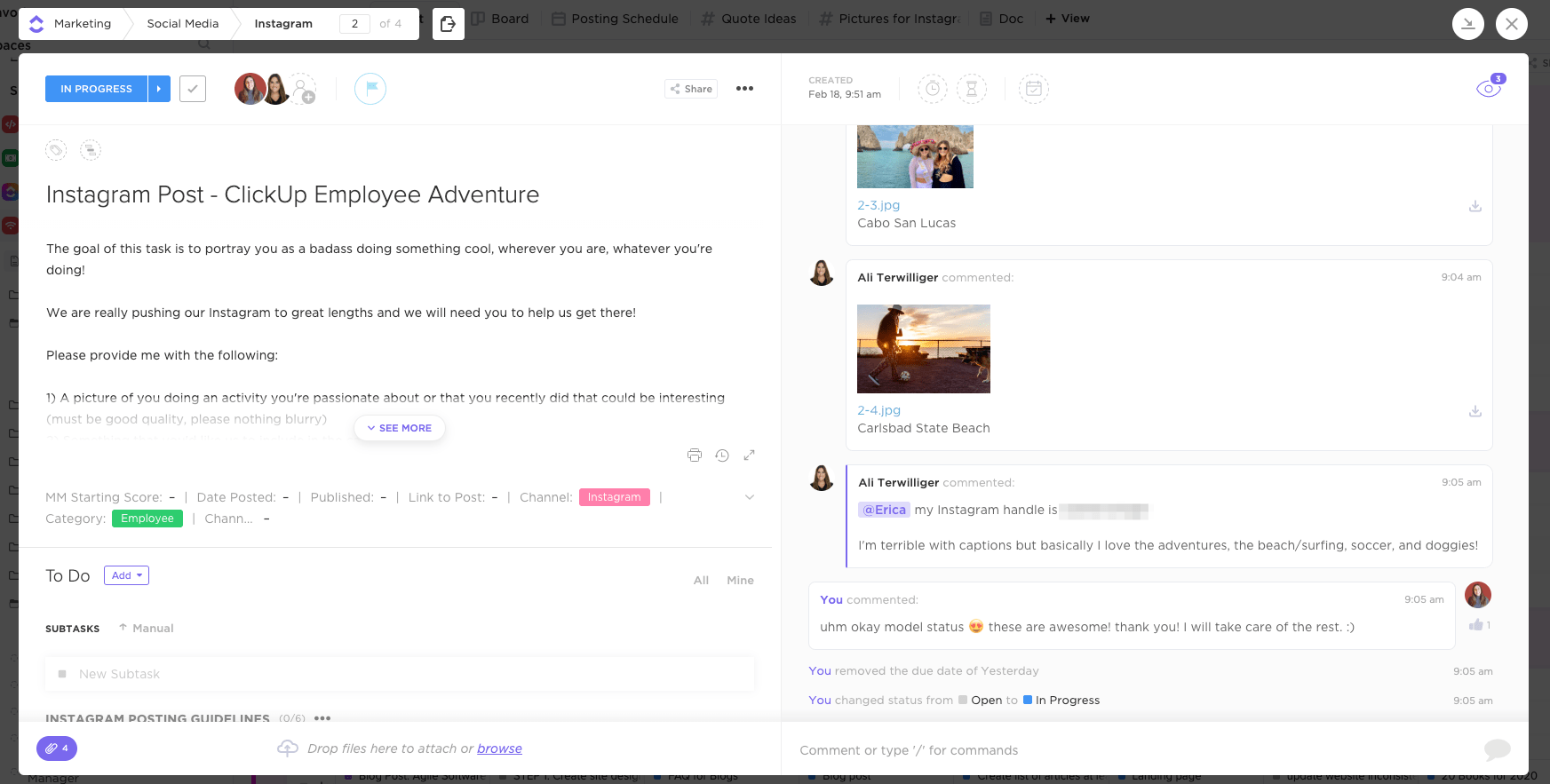
Project management software can alsointegratewith various communication tools, such as Slack and Skype, to ensure efficient communication. project is always just a click away!
D. Custom Statuses
Want to know why ClickUp can adapt so easily toAgile and Waterfall?
That’s because it adapts to anything!
Remember, each project has its own stages and niche-specific requirements. Your management tool must be able to handle these variations.
How ClickUp helps you with this:
Traditional project management tools typically provide a standard set of project status. ClickUp, however, allows you tocustomize them!them!
That way, you’re not stuck with a predefined set of statuses that don’t accurately reflect the stages of your project.
Why would this be a problem?
Imagine using the same set of statuses for your blog posts as you do for yoursoftware development projects!
However, with ClickUp’s customizable statuses, this isn’t a problem.
You can be as creative and detailed as you want –“Editorial Review”, “TestBeta”, “ Wireframing”,“Quality Check”– entirely up to you!
E. Sprint Lists
You can’t manage agile projects without sprint lists, right?
That’s why ClickUp can add checklists to all your projects, tasks, and subtasks to create sprint lists that detail your deliverables. Simply check off items from these lists as you move into the next sprint!
You can even add scrum points to each list to quickly tackle items in your product backlog.

F. Dashboards
ClickUp also comes with powerful dashboards for visualizing your project and sprint data.
Here’s a quick look at what you get:
- Velocity charts: to determine the completion rate for your tasks
- Burndown charts: to see how well your team is progressing against a goal line and visualize remaining work
- Burnup charts: to see how much you have completed against your scope
- Cumulative flowcharts: to track your project’s progress throughout the time

Conclusion
The Waterfall and Agile methodologies have their pros and cons.
And while each development methodology is perfect for a differentkind of project, you’ll still need the right project management software. has all the features you need to tackle the A gile and Waterfall frameworks and keep your projects on track!project management, you’ll still need the right project management software.
Luckily, ClickUp has all the features you need to handle the A gile and Waterfall frameworks and keep your projects on track! So let’s schedule a Demo!
Explore more
Everything TaskUP does with ClickUp, in English.