

Have you ever looked at the clock and asked yourself: “where did my day go?”
You started out full of plans, but along the way, meetings, emails and distractions took over.
That is where time mapping comes in. Instead of letting your schedule control you, this technique helps you visualize where your time goes and structure your day with intention.
No endless lists or last-minute rushing — just a clear, efficient plan.
🌻 Bonus: at the end of this article, you will find free ready-to-use templates, practical examples and tested time management techniques.
⏰ Quick Summary (60 seconds)
- Create a time map to visualize and eliminate waste in your routine
- Prioritize tasks with time blocking techniques, colors and strategic organization
- Use technology and automation to optimize your schedule
- Save time with ready templates time mapping
- With ClickUp, you can integrate calendar, priorities, automations and time tracking into one place
What is Time Mapping?
time mapping is a visual method of structuring your day, week or month into time blocks, organizing personal and professional activities clearly.
Different from a simple to-do list, it shows how your time is actually distributed, allowing you to adjust priorities and create a balance between work and personal life.
It is:
- Flexible, but structured
- Ideal for identifying waste
- A way to align energy, focus and results
Example in Practice
Imagine a freelance designer who needs to deal with:
- Client projects
- Emails and administrative tasks
- Studies of new tools
👉 No time mapping:
- E-mails interrupt creative work
- Learning is always for later
- Deadlines if accumulate and generate stress
👉 With time mapping:
- Mornings dedicated to creative and deep work
- Lunch time for emails and quick tasks
- Evening for learning and personal activities
The result? More focus, less overload and real balance.
Difference between Time Mapping, Time Blocking and Time Boxing
These three techniques are similar, but with different objectives. See the table below:
| Technique | Definition | Best for |
|---|---|---|
| Time Mapping | Complete visual representation of usage time, categorizing tasks and responsibilities | Professionals who need a broad view of time |
| Time Blocking | Reserving specific blocks of time for certain activities | Those looking for more focus and want to reduce distractions |
| Time Boxing | Set a fixed time limit for a task, stopping at the end | Those who procrastinate and need discipline |
👉 O time mapping is the most comprehensive strategy, as it combines detailed planning with flexibility.
Benefits of Time Mapping
Using a time map brings immediate and long-term:
- 📊 Total clarity about where your time is spent
- ⚡ Elimination of waste and interruptions
- 🧘 Balance between work and personal life
- 🎯 Effective prioritization focusing on what matters
- 😌 Reducing stress and decision fatigue
- 📈 Tracking progress based on real data
💡 Curiosity: Studies show that employees who receive support in time management and balance have greater productivity and engagement.
How to Create a Time Map in 6 Steps
Creating a time map is not about “filling every minute with tasks”, but structuring your routine strategically.
1. Find out where your time is going
- Do a time audit
- Record everything you do in the day (including quick breaks)
- Track the time spent on each activity
Example: a manager realized that 3 hours of the day were lost to interruptions and context switches.
2. List all your responsibilities
Include work and personal tasks:
- Projects, meetings, emails
- Household activities
- Time with family
- Health and leisure
👉 This way you don’t neglect important areas of your life.
3. Set priorities with the Eisenhower Matrix
Organize your tasks into 4 quadrants:
- Urgent and Important → deadlines, deliverables
- Important, but not urgent → planning, strategic projects
- Urgent, but not important → unnecessary meetings, distractions
- Neither Urgent Nor Important → low-value tasks
4. Structure blocks of time
Distribute activities according to your energy:
- Morning: deep work
- Mid of the day: meetings and communication
- Afternoon: administrative tasks
- Evening: leisure and self-care
5. Use colors to visualize your time
- 🟢 Green = Deep work
- 🔵 Blue = Meetings/Admin
- 🟡 Yellow = Personal/Health
- 🔴 Red = Family/Social
👉 A colorful calendar shows at a glance how well you’re balancing your activities.
6. Review and adjust weekly
- Check if you respected your blocks
- Measure how much time you actually spent on each task
- Adjust for the following week
The Role of Technology in Time Mapping
Digital tools simplify implementation:
- Digital calendars → Google Calendar, Outlook, ClickUp Calendar View
- Mapping time → ClickUp Time Tracking
- Task management → priorities, dependencies and automations in ClickUp
- Dashboards and reports → insights into time usage
- Integrations and automations → connection to Slack, Gmail and other tools
👉 The more integrated, the less manual effort you will have.
Time Mapping Templates to Use Now
Nothing better than starting with ready-made templates. Here are a few:
1. Time Management Template

📌 Best for: professionals who want a complete weekly organization system.
👉 Download Time Management Template
2. Time Boxing Template
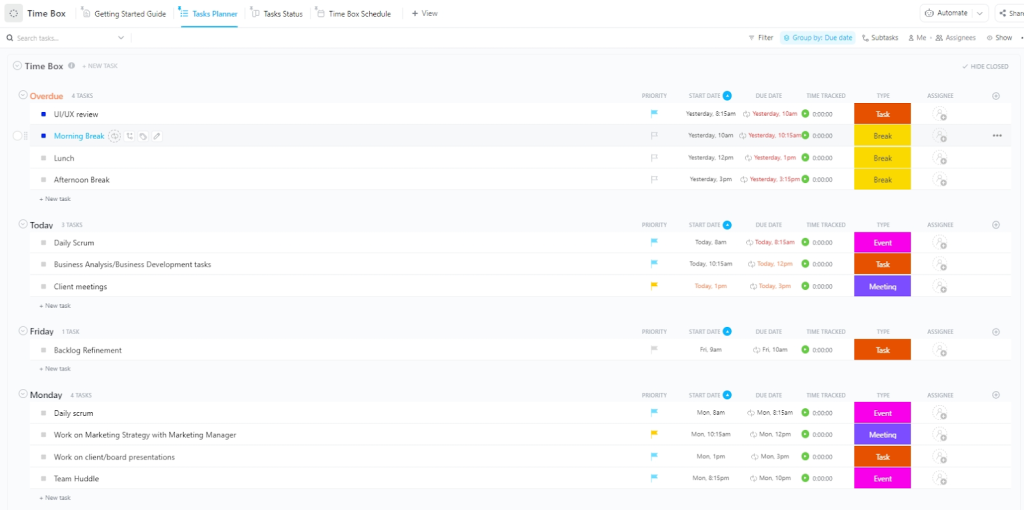
📌 Best for: those who need to limit time on tasks and avoid procrastination.
👉 Download Time Template Boxing
3. Time Allocation Template

📌 Best for: having clear view of the division between responsibilities (work, family, leisure).
👉 Download Time Allocation Template
4. Personal Time Management Spreadsheet

📌 Best for: balancing personal goals, routine and self-care.
👉 Download Personal Spreadsheet
5. 24h Agenda Template

📌 Best for: those who want to map all hours of the day and have maximum discipline.
👉 Download Agenda Template 24h
Conclusion: Master your Schedule with Time Mapping
Time is your most precious resource. Time mapping helps you use it intentionally, eliminate waste, and stay focused on what truly matters.
With the right templates and tools like ClickUp, you can:
- Plan better
- Work more efficiently
- Maintain a balance between personal and professional life
✨ Start creating your time map today and see the difference in your productivity.
Explore more
Everything TaskUP does with ClickUp, in English.